Shadowgrounds Cheats

Posted by Unknown Kamis, 02 Januari 2014 0 komentar

Shadowgrounds Cheats


While playing the game, press [F8] to display the console window. Enter one of the following case-sensitive codes, then press [F8] again to close the console window and activate the corresponding cheat function. Press [Up] or [Down] with the console window open to move through previously entered commands.

Enable developer debug menu and keysexternInclude developer:main
God modeexternInclude developer:immortal
God mode, full health, all weapons, ammo, upgradesexternInclude developer:stuffed
All weaponsexternInclude developer:givestuff
Ammunition for all weapons and 100 flashlight energyexternInclude developer:reloadstuff
Full healthexternInclude developer:fullhealth
All keys for levelexternInclude developer:giveallkeys
Lose all keys for levelexternInclude developer:loseallkeys
Open a nearby doorexternInclude developer:open_door
Open all remote doorsexternInclude developer:openallremotedoors
Close all remote doorsexternInclude developer:closeallremotedoors
Win current missionsetMissionSuccessCounter 1
Lose current mission, crashes gamesetMissionFailureCounter 1
Aliens spawn and attackexternInclude developer:spawn_alienattack
Warp player 300 units forward on mapexternInclude developer:warpforward
Warp player 3,000 units forward on mapexternInclude developer:warpmore
Spawn Alien Type 0externInclude developer:developer_spawn_alien1
Spawn Alien Type 4externInclude developer:developer_spawn_alien2
Spawn Alien Type 9externInclude developer:developer_spawn_alien3
Spawn Alien Type 11externInclude developer:developer_spawn_alien4
Hide user interfacehideGUI
Show user interfaceshowGUI
Display messagemessage [text]
All AI disabled, doors immovabledisableAllAI
All AI enabled, doors movableenableAllAI
Enemies cannot moveenableHostileAI
Enemies move againdisableHostileAI
Quit gamequit

Debug menu and developer keys

Use one of the following keys after the "externInclude developer:main" code is enabled. Press [F2] and [F3] to move through the debug menu options. Press [F4] to select the current option.
Toggle God mode[F6]
God mode, full health, all weapons, ammo, upgrades[F7]
GrenadeG
Warp player 300 units forward on map[F5]
Cycle camer mode[F9]
Open Anirecorder[F10]
Rotate camera leftI
Rotate camera rightO
Toggle unit modeK
Next camera angle boundaryL
Zoom camera in[Keypad Plus]
Zoom camera out[Keypad Minu]s
Zoom next camera[Keypad Enter]
Multiple unit select[Shift] + L
Multiple Unit select[Shift] + R
Select all units~

Baca Selengkapnya ....

Lego Marvel Super Heroes Cheats

Posted by Unknown 0 komentar

Lego Marvel Super Heroes Cheats

Cheat mode

Pause the game, select the "Extras" option, and choose the "Enter Code" selection. Then, enter one of the following codes to activate the corresponding cheat function:

Extras
2x Stud MultiplierUZFBG4
 
Vehicles
Avenging Cycle5T3CQU
Pumpkin Chopper35E41W
SHIELD Staff CarD5B7O3
Spider BikeSH9MZQ
 
Characters
BeetleKXFQ87
Black CatP9OWL0
Captain America (Classic)7HWU4L
CarnageAA0Z50
Howard The DuckJ58RSS
Hydra SoldierB7AA3K
Iron Man (Mark 17 - "Heart Breaker")2NGSRZ
Iron Man (Mark 38 - "Hulkbuster")CK7SDS
Iron PatriotQ5X1J5
MODOKSZ8Q06
Spider-Man (Future Foundation)WFOZXQ
Thor (Classic)H8CSE6
War MachineTQ4C57
Wolverine (with hood "cowl")OAW2LB
  • Bonus characters Successfully complete the indicated task to unlock the corresponding character:
      A.I.M. Agent: Successfully complete Level 10: "That Sinking Feeling".
      Abomination: Successfully complete Level 4: "Rock Up At The Lock up".
      Agent Coulson: Successfully complete the "Tabloid Tidy UP" bonus level.
      Aldrich Killian: Successfully complete Level 5: "Rebooted, Resuited".
      Ant-Man: Collect the Ant-Man token in the Industrial District.
      Archangel: Collect the Archangel token south of the X-Mansion (south of giant billboard).
      Arnim Zola: Successfully complete Level 6: "Red Head Detention".
      Beast: Successfully complete Level 8: "Juggernauts And Crosses".
      Beetle: Collect the Beetle token at one block east of the Central Park lake.
      Black Cat: Collect the Black Cat token at the cat pet shop, directly under Lady Liberty on the map; requires Spider-Man.
      Black Widow: Successfully complete Level 3: "Exploratory Laboratory".
      Blob: Collect the Blob token after completing the "Put Up Your Dukes" bonus level.
      Captain America: Successfully complete Level 2: "Times Square Off".
      Captain America (Comics): Successfully complete "The Brick Apple" bonus level.
      Captain Britain: Successfully complete "The Brick Apple" bonus level.
      Colossus: Collect the Colossus token at the front right courtyard of the X-Mansion.
      Cyclops: Successfully complete Level 8: "Juggernauts And Crosses".
      Damage Control: Collect the Damage Control token by putting out fires on the S.H.I.E.L.D. Helicarrier deck with the water gun.
      Deadpool: Collect all Deadpool Red Bricks.
      Doc Ock: Successfully complete Level 2: "Times Square Off".
      Doc Ock (Ultimate): Successfully complete the "Tabloid Tidy UP" bonus level.
      Doombot: Successfully complete Level 9: "Doctor In The House".
      Drax The Destroyer: Successfully complete Story mode, then complete three missions received from Drax.
      Electro: Successfully complete the "A Shock Withdrawal" bonus level.
      Frost Giant: Successfully complete Level 7: "Bifrosty Reception".
      Galactus (Playable): Successfully complete Level 15: "The Good, The Bad And The Hungry".
      Gambit: Successfully complete three of Gambit's missions".
      Gamora: Successfully complete Story mode, then complete the first missions received from Drax.
      Green Goblin: Successfully complete Level 9: "Doctor In The House".
      Groot: Successfully complete Story mode, then complete three missions received from Groot.
      H.E.R.B.I.E.: Successfully complete Level 2: "Times Square Off".
      Hawkeye: Successfully complete Level 3: "Exploratory Laboratory".
      Howard the Duck: Successfully complete the "Nuff Said" bonus level.
      Hulk: Successfully complete Level 1: "Sand Central Station".
      Human Torch: Successfully complete Level 6: "Red Head Detention".
      Iceman: Successfully complete Level 8: "Juggernauts And Crosses".
      Invisible Woman: Successfully complete Level 9: "Doctor In The House".
      Iron Fist: Successfully complete the race mission with Blade, then win the fight with the ice enemies in the Blade mission.
      Iron Man (Heroic Age): Successfully complete Deadpool's "New York Event" bonus mission.
      Iron Man (Hulkbuster): Land on the "S" sign landing platform, then destroy all air vents around the "S" sign.
      Iron Man MK I: Successfully complete Level 5: "Rebooted, Resuited".
      Iron Man MK VI: Successfully complete Level 1: "Sand Central Station".
      Iron Man MK VII: Successfully complete the "House Party Protocol" bonus level.
      Iron Man MK XLVII: Successfully complete Level 5: "Rebooted, Resuited".
      Iron Man MK XVII: Successfully complete the "House Party Protocol" bonus level.
      Jean Grey: Successfully complete Level 8: "Juggernauts And Crosses".
      Juggernaut: Successfully complete Level 8: "Juggernauts And Crosses".
      Kraven The Hunter: Collect the Kraven token by shooting the five targets next to the Godzilla-type icon at Central Park.
      Loki: Successfully complete Level 15: "The Good, The Bad And The Hungry".
      M.O.D.O.K.: Successfully complete Level 10: "That Sinking Feeling".
      Magneto: Successfully complete Level 13: "Magnetic Personality".
      Maria Hill: Successfully complete Maria Hill's three missions on the Helicarrier.
      Mister Fantastic: Successfully complete Level 2: "Times Square Off".
      Mysterio: Successfully complete the "Thrill Of The Chess" bonus level.
      Mystique: Successfully complete Level 12: "Rapturous Rise".
      Nick Fury: Successfully complete Level 9: "Doctor In The House".
      Nova: Successfully complete the foot race mission with Nova to the east of the Godzilla-type icon at Central Park.
      Professor Xavier: Successfully complete Professor Xavier's three missions behind the X-Mansion.
      Psylocke: Successfully complete all Captain Britain's missions.
      Pyro: Successfully complete Level 8: "Juggernauts And Crosses".
      Red Skull: Successfully complete Level 6: "Red Head Detention".
      Rhino: Successfully complete Level 12: "Rapturous Rise".
      Rocket Raccoon: Successfully complete the following three missions: Garbage truck northwest of Central Park, just east of the "Feeling Fisky" bonus mission, and three or four blocks south of the east coast.
      Ronan the Accuser: Collect the Ronan character token by finding the hidden path behind the statue south of his icon.
      Sandman: Successfully complete Level 1: "Sand Central Station".
      Silver Surfer: Successfully complete three Silver Surfer missions.
      Spider-Man: Successfully complete Level 1: "Sand Central Station".
      Spider-Woman: Collect the Spider-Woman token west of the park, on the southern-most part of the island.
      Squirrel Girl: Collect the Squirrel Girl token on the docks, northwest of the "Put Up Your Dukes" bonus mission.
      Stan Lee: Rescue all 50 Stan Lees.
      Star-Lord: Successfully complete three missions from Star-Lord.
      Storm: Successfully complete Level 8: "Juggernauts And Crosses".
      Symbiote Scientist: Successfully complete Level 3: "Exploratory Laboratory".
      The Destroyer (Playable): Successfully complete Level 7: "Bifr


  • Baca Selengkapnya ....

    Edit JVC GY-HM650U ProHD MXF files with iMovie on Mac 10.9 Mavericks

    Posted by Unknown 0 komentar
    Summary: This guide will show you how to easily convert and import JVC GY-HM650U ProHD MXF footage into iMovie for further editing on Mac (OS X 10.9 Mavericks included).

    "I have a JVC GY-HM650U ProHD camcorder that records .MXF video format, now I would like to import these projects to iMovie for editing. What I want is to edit MXF files smoothly without codec problems, what video codec should I use? Can you recommend some software which can help me import and convert JVC MXF to iMovie smoothly?"

    Everything goes perfect until you try to edit JVC GY-HM650U .mxf file in iMovie. Fail in import the MXF file into iMovie as iMovie can't recognize this file. Why does it happen? The answer is MXF file format incompatibility with iMovie (even iMovie'11).

    As far as I know, in order to edit JVC GY-HM650U ProHD MXF files in iMovie flawlessly, the best method is to convert JVC MXF to Apple InterMediate Codec (AIC) which is a best editing codec for iMovie.

    At first, you need 3rd-party tool - Pavtube MXF Converter for Mac
    (Breaking news: Pavtube has started the Christmas & New Year Promotion, if you buy MXF Converter for Mac, you can free get MKV Converter for Mac / FLV Converter for Mac / MOD Converter for Mac / TOD Converter for Mac. Never miss!)
    It is a professional MXF to iMovie Converter which can not only convert JVC GY-HM650U ProHD recorded MXF files to AIC for iMovie editing on Mac OS X Mavericks, but also provide simple video editing functions for you. This Mac MXF Converteris especially designed for converting Panasonic P2 MXF, Sony XDCAM MXF, http://www.pavtube.com/canon-camera-file-transcode.html]Canon XF MXF files for editing in Final Cut Pro, Final Cut Pro X, Final Cut Express, iMovie, Avid, Adobe Premiere etc. Below is how. (Learn more about MXF: MXF Column)

    Guide - Encode JVC GY-HM650U ProHD MXF to AIC for iMovie editing on Mavericks

    Step 1. Import MXF files from JVC GY-HM650U to the top MXF to iMovie Converter for Mac.

    (Note: Before conversion, you need to transfer MXF files from your JVC GY-HM650U to Mac Hard Drive, then click the "add" button to browse to import MXF videos. This MXF Converter for Mac support batch conversion)


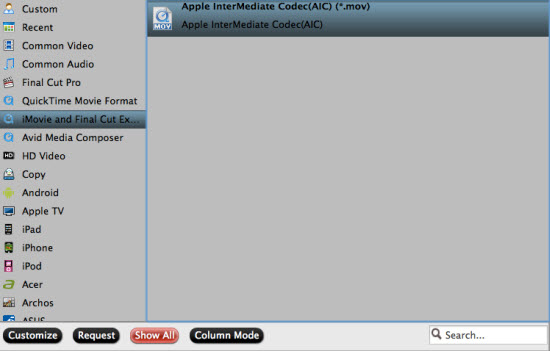
    Step 2. Click the Format bar, and move mouse cursor to "iMovie and Final Cut Express -> Apple InterMediate Codec (AIC) (*.mov)", it's the best format for editing in iMovie.

    convert mxf to aic mov for imovie

    Step 3. Click "Convert" button to start transcoding JVC GY-HM650U ProHD MXF files to AIC Codec for iMovie under Mac OS X 10.9 Mavericks.

    iMovie Importing: How to import video files or projects to iMovie?

    Some more helpful features of the app:

    1. Settings- click to set video resolution(1920×1080/1440×1080/1280×720/720×480), bitrate(from 1Mbps to 20Mbps), frame rate (24p/30p)

    2. Editor (next to "Add" icon)- click to set deinterlace, denoise, mute, volume up, trim, crop, etc.

    So there you have it. Pretty simple. After the workflow, you can go to the output folder to find the converted video files. Now you are free to start importing/editing JVC GY-HM650U ProHD MXF files in iMovie under Maveircks without problems.

    Tips: 

    If your videos files have more than two audio channels, and you want to convert to MOV file with all multiple audio tracks preservation, Pavtube iMixMXF can help you to get it done. With it you are allowed to preserve all or any audio tracks for output MOV and mix the multiple audio tracks into one if you need.

    Read more solutions:
     

    Baca Selengkapnya ....

    'Grand Galaxy 2 Neo with slightly smaller 5-inch screen pops up' - Android Planet

    Posted by Unknown Rabu, 01 Januari 2014 0 komentar

    Galaxy Grand Neo 2 The first new Samsung phone 2014 may be a fact. Rumors are that the electronics manufacturer is working on a slightly smaller, and possibly cheaper version of the recently announced Galaxy Grand 2. This Android device has a 5.25-inch screen, while the Galaxy Grand 2 Neo that’s being discussed, it does with a 5 inch screen. Unlike the Grand 2, the display of the Grand Neo 2 a WVGA resolution, which equates to 800 by 480 pixels. With a screen size of 5 inches, the pixel density is 187 ppi, not exactly sharp so

    .

    Beneath the Galaxy Grand Neo 2 may be equipped with a 1.2 GHz quad-core processor chip designer MediaTek. These energy-efficient Cortex A7 SoC that can handle dual-sim, bluetooth, 3G/WiFi, GPS and FM radio. It also supports the A7 SoC camera sensors up to 13 megapixels. However, it is still unclear whether the Galaxy Grand Neo 2 will include these features.

    It is however in line with the expectation that the Galaxy Grand Neo 2 will be higher than its bigger brother, which features a 720p screen. slightly cheaper Previously confirmed Samsung Android versus the Samsung Galaxy Grand Planet 2 will be available for a suggested retail price of 399 euros. Sale early 2014 Users who buy Galaxy Grand 2, can choose between white, black and pink variety.

    addition, the Grand 2 two cameras with 8 (rear) and 1.9 megapixel (front). Furthermore, the quad-core processor, the Galaxy Grand 2 (Qualcomm Snapdragon 400) a lot faster than its predecessor and the unit 1.5GB RAM and 8GB of storage.

    • ‘Galaxy Grand 2 Neo with slightly smaller 5-inch screen pops up’ (2-1)
    • Video: This is the future of Samsung, including a coffee cup with LCD (31-12)
    • ‘Galaxy S5 memory: new LPDDR4 4GB RAM Samsung’ (30-12)
    • ‘Samsung Android 4.3 update allows for shorter battery life’ (and this helps) (30-12)
    • Samsung Galaxy S5 concept shows interesting curved smartphone show (29-12)

    clear=”all”


    Baca Selengkapnya ....

    Decrypt and remove commercials from Tivo recording for playback on Windows/Mac

    Posted by Unknown 0 komentar
    A Tivo Converter Customer Review From Pavtube:
    I have recorded an entire season of favorite TV plays via Tivo box and it have the commercials on it with Tivo. How can I skip them? TiVo DVRs do not offer a commercial skip feature. It’s totally understandable as the commercial is a part of the source signal; but it troubles me a lot when playback the recorded TV plays: I have to pause and skip the ads manually. I used to be fine with that but now my daughter grows up and she’s fond of this: every time when it comes to ads she will cry. I’m totally not computer-savvy but have to look for a good solution.
    It’s widely accepted that TV recordings from Tivo box are protected; we cannot edit or change it nor remove the ads within that context. After spending several days browsing the websites, finally I get this Pavtube Video Converter Ultimate to work. It’s very easy to convert tivo files and you don’t need to change any specs; also the ads trimming is quite simple. Moreover, I also convert and copy many Disney Blu-ray movies to my Nabi 2 android tablet, my daughter can watch these movie on Nabi 2 when I'm busying in my yard. (I got 20% off coupon on their Christmas deals) 
    Note: If you only have a Mac, the Mac version is more suitable
    My workflow: Decrypt and remove commercials from Tivo recordings for different purposes on my computer
    1. Install and launch this Tivo Converter; drag and drop Tivo recordings to it. Or you can click the small “plus” icon to load Tivo recordings. Pls note the first disc-like icon is to load discs – yes this tool also support converting Blu-rays and DVDs. 
    2. Submit Tivo Key. 
    This Tivo Converter requires your Tivo key to play the recordings. (Tips: How To Find Tivo Media Access Key) 
    Right after you drag the media files to this program, it will pop up a window asking for the key; see this screenshot: 
     
    Enter it and import the media files again; it will remember your key automatically so that we don’t need to set it any more. 
    3. Remove commercials from Tivo recordings. 
    Now back to the main interface; hit the pencil-like icon on the top to enter the video editor. It’s on “Trim” mode by default. Drag the two small triangles on the progress bar, you can customize the start/end point. 
    Or you can submit the start and end timing on the below.
    Hit “OK”. 
    4. Choose format and convert. 
    Find the “Format” drop-down list, there’re many presets for different using. As my only need is to watch on computer and Nabi 2 tablet, the MP4 format is most common so I chose it. Then hit the big “Convert” to start converting Tivo recording or Disney Blu-ray movie to MP4 on computer. After it completed, click “Open output folder” to get converted videos and save it to my drive for playback.
    Here is some Related articles about Pavtube softwares:

    Baca Selengkapnya ....

    First official look at "Guardians of the Galaxy" - Total Film

    Posted by Unknown 0 komentar
    Posted by Bram on 01-01-2014 10:43 – Source: First Showing

    Below is the first image of the cast that plays the main role in Marvel Studios’ Guardians of the Galaxy . The sci-fi “Phase 2″ superhero film directed by James Gunn (Super , 2010) appears August 14 in the Dutch cinema.

    From left to right are Gamora (Zoe Saldana ), with the voice of Bradley Cooper), Drax the Destroyer (Dave Bautista) and Large (voice of Vin Diesel) to see. Star-Lord (Chris Pratt), Rocket Raccoon ( Other roles for Michael Rooker (Yondu), Glenn Close (Nova Prime), John C. Reilly (Rhomann Dey) and Benicio Del Toro (The Collector).

    Mouse click to enlarge

    © 2014 Total Film | Film Information | News

    Related news:
    • 22-12-2013: Vin Diesel poses with his character from Grand ‘Guardians of the Galaxy
    • .

    • 16/12/2013: Special 2014: the biggest releases Explained (Part 3)
    • 08-12-2013: Bradley Cooper on his role as Rocket Raccoon in ‘Guardians of the Galaxy’
    • 30-11-2013: “Millennium Falcon rebuilt for ‘Star Wars: Episode VII’”
    • 26-11-2013: Marvel confirms new protagonists ‘The Avengers: Age of Ultron’
    • 24-11-2013: Chris Pratt about his role in ‘Guardians of the Galaxy’


    Baca Selengkapnya ....

    Possible press image Samsung Galaxy Tab 8.4 Pro turns up - Tablets Magazine

    Posted by Unknown 0 komentar

    Also in 2014, we happily continue with rumors of new tablets and Samsung may brunt this year. The Korean manufacturer would soon have a 8.4-inch tablet launch according to recent rumors and today may be the first image of the tablet appeared.

    render below, put online by Move Player, we may see the now much discussed Galaxy Tab Pro 8.4. I say possible because the site has previously put images online that seemed to be. Rigged But, if we just assume that we actually see Samsung’s latest tablet here, we can at least conclude that from the Korean manufacturer adheres to the design that the Galaxy Note 3 and Galaxy Note 10.1 2014 was launched. Thus we see include the silver edges and fake leather back back.

    Galaxy Tab Pro 8 4 Possible leak press image Samsung Galaxy Tab 8.4 Pro emerges

    about the specifications of the Galaxy Tab 8.4 Pro is still little known, apart from the size of 8.4-inch. There are rumors of an AMOLED display that high contrast and deep black levels creates, and probably the tablet comes with a resolution of 1,920 by 1,080 pixels. In terms of other specs, the tablet would largely correspond with the Galaxy Note 10.1 (2014), and thus have a memory of 3GB and a Qualcomm Snapdragon processor 800.

    now it remains so guess what we can expect exactly, but that Samsung is during CES 2014 with a number of new tablets seems almost certain. In addition to rumors about the Galaxy Tab 8.4 Pro go though several rumors of a Galaxy Tab 10.1 Pro, an inexpensive Galaxy Tab 3 Lite , and a large Galaxy Note Pro 12.2 .


    Baca Selengkapnya ....
    Trik SEO Terbaru support Online Shop Baju Wanita - Original design by Bamz | Copyright of android kawaii.